Wan 3.0 for AI Video from a Photo of a Real Person
Upload one photo, describe the scene, and Wan 3.0 builds a new shot that keeps the person's face.
GOGUL team2 min read
Try it on your own idea in GOGUL.
Try Wan 3.0 in VideoKey facts
| Max resolution | 1080p |
|---|---|
| Max clip length | 30 s |
| Reference images | 10 + audio |
Wan 3.0 is now available in the GOGUL Video generator. It turns a photo of a real person into a video clip up to 30 seconds long in 1080p. The face stays recognizable from the first frame to the last. Upload the photo as a reference in Reference or Image-to-Video mode, describe the scene, and Wan 3.0 animates it.
What is Wan 3.0 photo to video?
Wan 3.0 is an AI video model that uses your photo as the source of the character. Instead of inventing a random face, it keeps the person from your image: facial features, hairstyle and overall look.
- Resolution: up to 1080p
- Duration: up to 30 seconds per clip
- References: up to 10 images plus an audio file
- Modes: Reference and Image-to-Video
What can you make with it?
- Personal videos: put yourself into a travel scene, a music clip or a short story.
- Ads with a real face: show a founder, an expert or a brand ambassador without a film shoot.
- Short films and series: keep the same character across several shots.
- Social media content: Reels, Shorts and TikTok clips from a single portrait.
How to turn a photo into video in GOGUL
- Open the AI Video Generator and choose Wan 3.0.
- Select Reference or Image-to-Video mode.
- Upload a clear photo of the person. You can add more angles and an audio file.
- Describe the scene: action, place, camera movement and mood.
- Check the price on the Generate button and start the generation.
Need the photo first? Create or edit a portrait in the AI Image Generator. Planning several shots? Break your script into scenes with Script to Storyboard.
Tips for keeping the face consistent
- Use a sharp, well-lit photo where the face is clearly visible.
- Add 2–3 photos from different angles for better results in turns and profile shots.
- Describe what the person does, not how they look: the photo already defines the appearance.
- Keep the camera closer for emotional scenes and wider for action.
Who is it for?
Wan 3.0 is useful for creators, marketers and small teams who need a video with a specific person and don't have time or budget for a shoot.
Only use photos of people who have given you permission to create videos with their likeness.
Prompt → result
Prompt
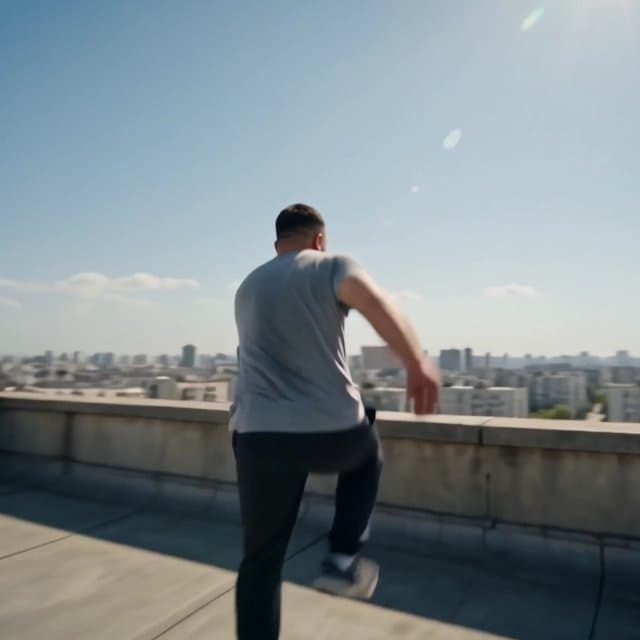
Single continuous handheld shot, no cuts. The person in #Image1 runs full speed across a sunlit concrete rooftop and vaults a low parapet wall. Their face, features, beard and skin tone stay exactly as in #Image1 . The camera runs alongside and slightly behind at hip height, then swings wide and drops below the parapet as they clear it, catching them airborne against the open sky, then rises to meet them as they land into a roll and come up facing the lens. One unbroken move, raw and kinetic, the operator clearly running. Bright hard midday sun, blue-white sky, no clouds. Bleached concrete, rusted rooftop vents, a sea of pale apartment blocks stretching to the horizon. Dust kicks up on the landing and catches the light. Colours clean and saturated, deep contrast, sharp shadows under the body mid-air. They wear a plain grey t-shirt and dark track pants, fabric snapping in the wind. Hands find the parapet, weight goes over, legs tuck and extend. On landing the shoulder rolls, they rise breathing hard, one glance back at the gap they just cleared, then straight into the lens. Camera: 24mm wide, low, following at speed. Motion blur on the edges of frame, brief lens flare as it swings toward the sun, natural camera shake from running. Gritty, documentary-action feel, filmic grain. Audio: sneakers hitting concrete, wind rush past the mic, hard breathing, distant city traffic below. No music. No speech. No cuts, no scene changes, no on-screen text, no logos, no other people in frame.
Wan 3.0 · Reference · 1080p · 5 s
How to get started
- Video
- Wan 3.0
- Reference
FAQ
- Can I make a video from a photo of myself?
- Yes. Upload your photo as a reference in Reference or Image-to-Video mode, and Wan 3.0 keeps your face in the video.
- How long can the video be?
- Up to 30 seconds per clip, in resolution up to 1080p.
- How many photos can I upload?
- Up to 10 reference images, plus one audio file.
- How much does it cost?
- The exact price is shown on the Generate button before you start, based on duration and resolution.
- Can I use a photo of someone else?
- Only with their permission. Use your own photo or a photo of a person who has agreed to appear in the video.